
To get a pay stub when you are paid by direct deposit, start with your employer’s payroll or employee portal—not your bank app. Look for “Pay,” “Pay statements,” “Earnings,” or “Payroll history,” select the payday, and download the statement. If you cannot find it, ask payroll or HR how wage statements are delivered and request a copy for the specific pay period. A bank transaction confirms that money arrived; it does not show the employer’s full earnings and deduction calculation.
This guide is for U.S. employees. Whether an employer must give you an itemized statement depends partly on state law. The federal Fair Labor Standards Act requires covered employers to maintain wage records, but it does not itself require them to hand employees pay stubs; the U.S. Department of Labor explains both points in its FLSA FAQ. Do not assume direct deposit changes the law that applies to your workplace.

Where to find a pay stub after direct deposit
- Open the employer’s employee or payroll portal. Find a menu such as Pay, Pay statements, Earnings, Payroll, or Documents. Choose the payday or pay period you need. Some employers use a separate payroll provider, so your normal scheduling or benefits login may not contain statements.
- Check messages from payroll. A work email or secure notification may tell you that a statement is ready. For privacy, use your employer’s known login address instead of opening an unexpected attachment or entering a password through an unverified link.
- Download the employer-issued file if available. Check the employee name, employer, pay period, pay date, earnings, deductions, and net pay before saving a copy. The fields vary with the job and state. If the portal offers only a bank deposit confirmation, keep looking for the earnings statement.
- Ask payroll or HR if the location is unclear. Tell them the payday and your preferred way to receive or securely access a copy. An employer can explain its own system more reliably than your bank can.
Keep the statement in a private folder and avoid sending an unredacted copy through a public link. Our pay-stub sharing checklist explains how to limit exposure when someone legitimately asks for a copy.
Why the bank deposit is not the pay stub
The bank usually records the amount credited and the transaction details. The employer’s wage statement explains how a payment was calculated: the period covered, gross earnings, taxes and other deductions, and net pay. Some statements also show hours, pay rates, and year-to-date amounts. The Consumer Financial Protection Bureau distinguishes a paycheck from the pay stub that records earnings and deductions.
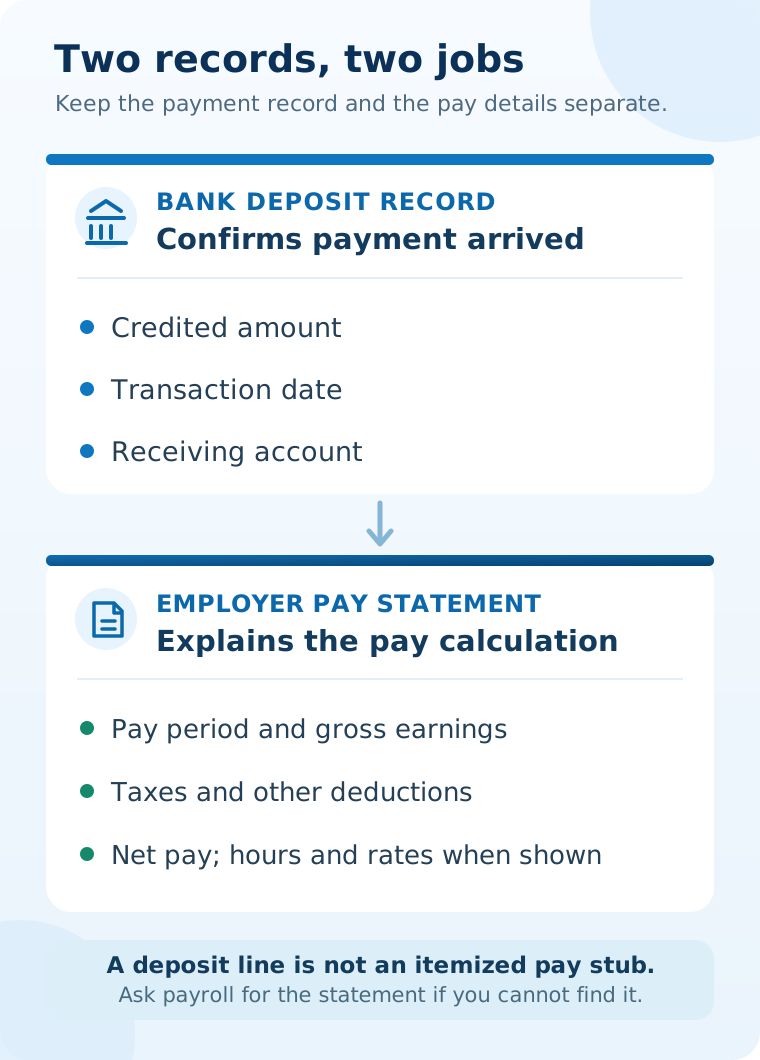
Your bank may supply a transaction record or account statement, but it cannot issue the employer’s original itemized wage statement. A tax Form W-2 is an annual summary, not a replacement for each payday’s statement.
What if you cannot log in or the statement is missing?
First confirm that you are using the payroll portal for the right employer and that you selected the correct pay date. A pay period and its payment date are different; the statement for work done last week may be filed under this week’s payday. Our pay-period versus pay-date guide shows how to read those labels.
If your account is locked, use the employer’s official password-reset process or contact its payroll administrator. If you recently joined, changed jobs, or left the company, ask when portal access starts or ends and how historical statements can be retrieved. If the payday is recent, ask whether processing is complete before assuming the statement has been omitted.
Do not send your bank password, full account number, or unrelated identity documents merely to request a pay statement. Payroll can tell you what information it needs to verify your identity through its normal channel.
What to ask payroll or HR for
A precise request is easier to resolve than “I need proof of payment.” You can write:
“I was paid by direct deposit on [pay date], for the pay period [dates if known]. I cannot locate the itemized pay statement in the employee portal. Please tell me where to access it or send me a secure copy of the employer-issued statement for that payday.”
Ask for the wage statement or earnings statement, not a new bank receipt. If you need several pay periods, list the dates. If a third party requested proof of income, check its specific document requirements; it may accept a genuine pay stub, an employer verification letter, bank records, or a combination. Do not alter a document or present a self-made record as though payroll issued it.
How to compare a recovered stub with the deposit
Start with the pay date and the current net pay on the employer’s statement. Then find the bank credits for that payday. In a straightforward single-account payment, the net pay and deposited amount should agree. For a fictional example, $1,500 in gross pay minus $300 in total deductions equals $1,200 net pay; one $1,200 bank credit would match. This is arithmetic for illustration, not an estimate of anyone’s taxes.
If the employer splits that same fictional $1,200 net payment into $900 to checking and $300 to savings, neither transaction by itself matches the stub, but their sum does. A separate reimbursement, an advance, a reversal, or a bank posting delay can also change what you see on one line. Compare all related transactions and ask payroll how they map to the statement. Our guide to a direct deposit that differs from net pay walks through those checks in detail.
If the pay period, hours, rate, or deduction still looks wrong, record the specific line and ask payroll to review it. A bank credit alone cannot settle an earnings or withholding question.
What if the employer does not provide a pay stub?
Do not assume that federal law alone answers the question. The Department of Labor’s recordkeeping guidance requires covered employers to keep specified wage records, but the FLSA does not generally require a pay stub to be given to employees. State rules may be stricter. For example, California requires an itemized wage statement with listed information when wages are paid, and New York requires wage statements with each wage payment. Those are examples, not rules for every state or worker.
If you cannot get the statement after contacting payroll, check your state labor agency’s current wage-statement guidance for your job and location. Keep a dated record of the paydays and your request. Where a statement is required and not supplied, the agency can explain the relevant complaint or records-access process. Avoid filling the gap with a fabricated employer document.
What changes after leaving a job or working as a contractor?
If your old payroll login no longer works, contact the former employer’s payroll or HR team and request the specific historical statements. Include your employment dates and a safe contact method. See our former-employer pay-stub guide for a more complete retrieval checklist.
If you are genuinely self-employed for a client payment, that client may not run employee payroll or issue an employee pay stub. Keep the contract, invoices, payment confirmations, and bank records instead, and check any applicable tax reporting. Our contractor records guide explains the distinction. Worker classification depends on the actual relationship, not merely the label on a payment.
Common questions
Can my bank print a pay stub for a direct deposit?
No. It can provide a bank transaction or statement, but the itemized payroll record comes from the employer or its payroll provider. Ask payroll for the actual wage statement.
Does direct deposit mean my stub must be online?
No universal rule ties the method of payment to one delivery format. Your employer may use a portal, secure electronic delivery, or another method consistent with applicable law. Ask where and how statements are made available.
Is a deposit screenshot enough for proof of income?
That depends on the organization asking. A screenshot may show a credit but not gross wages, deductions, or the pay period. Ask the recipient which genuine records it accepts, and share only the information it needs.
What if I was paid but the stub shows a different net amount?
Check for split deposits or separate transactions, then compare the pay date and current net amount. If the totals still disagree, ask payroll to reconcile the payment; do not change the statement yourself.