
To make a check stub, gather the records for a specific payment, enter the employee and employer details, add earnings and deductions, and compare the completed document with those records before saving it. The most important part is getting the information right before you begin.
1. Gather your records
Start with the employee and employer details, the pay period, payment date, and the earnings and deduction records for that payment. If you are an employee trying to obtain a missing employer-issued stub, contact your employer or payroll provider first.
- Employee and employer names and applicable addresses.
- The start and end of the pay period and the payment date.
- Recorded earnings, including any applicable additional pay.
- Recorded deductions and withholdings.
- Prior payroll records if year-to-date figures are included.
2. Enter the pay details
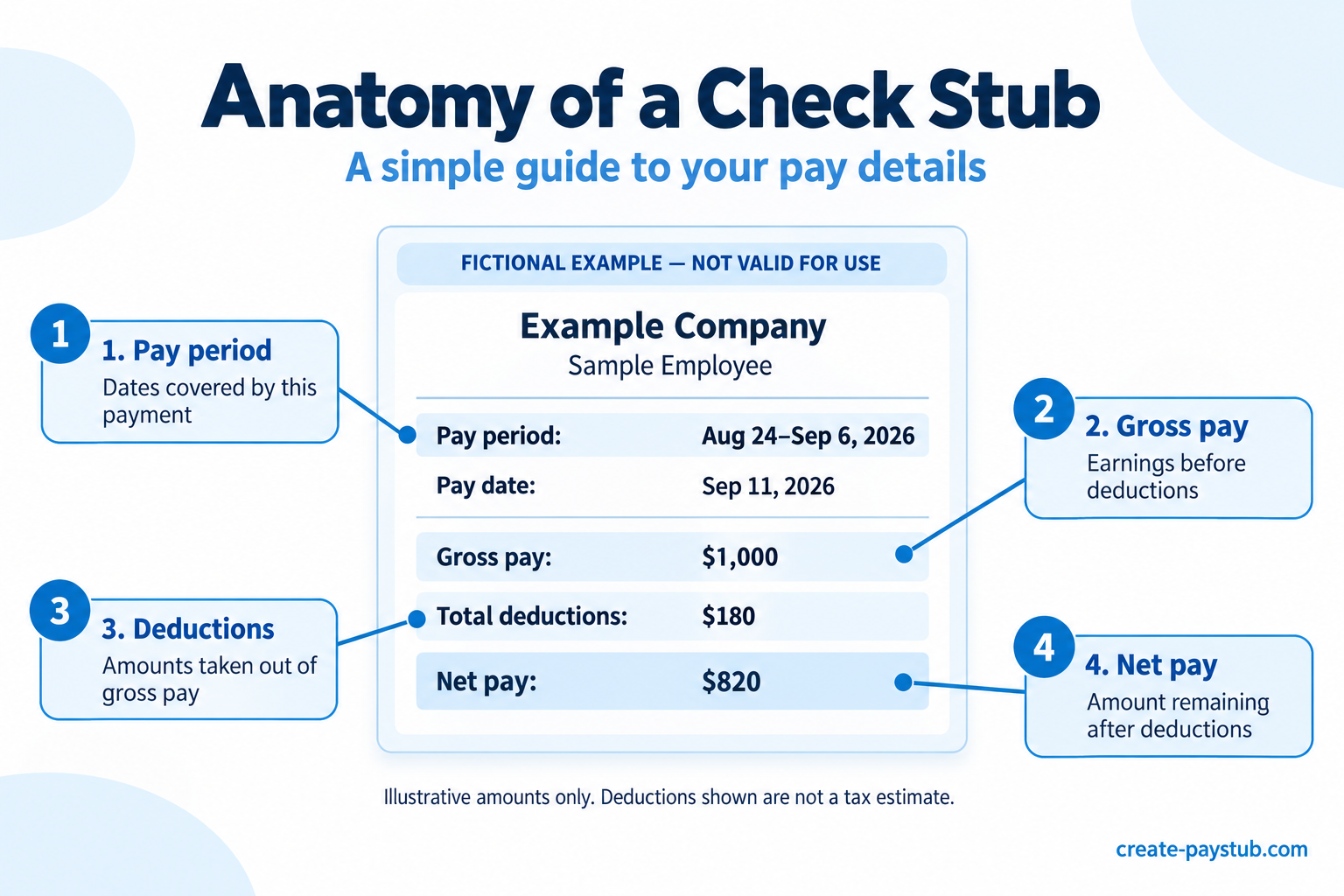
Enter the information into the appropriate fields in your chosen tool. Keep the pay period separate from the payment date: one describes the period covered, while the other identifies when payment occurred.
Use the earnings and deductions from your records. A formatted document does not independently verify the figures you enter.
For example, a payment made on September 11 might cover work from August 24 through September 6. These are illustrative dates, not a recommended payroll schedule. Use the dates in your actual records.
Understand gross pay, deductions, and net pay
Gross pay is the amount earned before deductions. Net pay is the amount remaining after taxes and other deductions. The Consumer Financial Protection Bureau’s pay stub guide explains these fields and common deduction labels.
For an hourly payment, compare the recorded hours and rate with the earnings shown. If the payment includes overtime, bonuses, or other earnings, use the applicable payroll records rather than folding every amount into regular hours.
Enter deductions using the amounts established for that payment. Do not choose a flat tax percentage simply to reach a preferred take-home amount. If a withholding or deduction is unclear, check with the person responsible for payroll.
Suppose a payment has $1,000 in gross earnings and $180 in total employee deductions. Net pay is $820: $1,000 − $180 = $820.
The $180 is an invented example total, not a tax estimate or withholding recommendation.
3. Review the finished document
Compare each field against the source records. Check spelling, dates, amounts, and any year-to-date figures before completing your document.
Make sure the document describes the correct person and payment. Do not substitute estimated earnings or invented employer details for missing records.
If a figure is unclear, resolve it with the person responsible for payroll before proceeding. Requirements can vary, so this checklist is not a substitute for applicable payroll rules.
- Are the pay period and payment date correct?
- Are all applicable earnings included once?
- Do the deductions and net pay agree with the payment records?
- If year-to-date figures appear, do they include the correct earlier payments and the current payment?
Do not calculate year-to-date pay by multiplying the latest payment by the number of pay periods unless your records confirm that every included payment is identical. Changes in hours, bonuses, and deductions can make that shortcut inaccurate.
Keep employee deductions separate from amounts the employer pays without deducting them from the employee’s wages. When correcting a mistake, review the affected totals again.
4. Save your records
Save the completed document securely with the records used to prepare it. Limit access because pay records can contain personal information.
If you intend to submit income documentation to another organization, ask which documents it accepts. Creating a check stub does not guarantee acceptance or verify employment.
Need help interpreting the fields before you begin? Read our guide to understanding earnings, deductions, and net pay on a check stub.
Using Create Pay Stub
With your records ready, open the regular pay stub maker, enter your details, and review the information and calculations before completing your order.
Common questions
Is a check stub the same as a pay stub?
The terms are commonly used for the document that records earnings and deductions for a payment. The document’s actual fields matter more than which label appears at the top.
Can I create a stub if I receive direct deposit?
A pay record can accompany a direct deposit payment. If you need the employer’s official record, check your payroll portal or request it from payroll rather than recreating it from the bank deposit alone.
Can I work out gross pay from my bank deposit?
The deposit alone does not show every earning and deduction. Gather the underlying payroll details so you do not have to guess the amounts that produced the deposit.
Will an organization accept a check stub I create?
Ask the recipient which documentation it requires. A generated document does not guarantee acceptance, verify employment, or replace other records an organization may request.