
To read a check stub, start with the pay period, then follow the money: earnings before deductions, amounts withheld, and the net pay left over. Finally, distinguish the figures for this payment from the year-to-date totals.
This guide explains those fields on a typical U.S. employee pay stub. Employers use different layouts and abbreviations, so your document may not look exactly like the example.
1. Check the dates and identity details
Confirm the employee and employer names first. Then find the pay period, which identifies the dates covered, and the pay date, which identifies the payment date.
For example, a pay period might run from August 24 through September 6, 2026, with a payment date of September 11. When comparing hours with a timesheet, use the period covered rather than the week in which the money arrived.
2. Read your earnings
Gross pay is earnings before taxes and other deductions. An earnings section may separate regular wages, overtime, and additional pay such as a bonus. Read the individual lines before checking the total.
For a simple example with no additional earnings, 40 recorded hours at $25 per hour produces $1,000 in gross wages. If your stub includes other earnings, check those against the corresponding payroll records too. A single hours-times-rate calculation may not explain the whole payment.
For salaried work, compare the payment with your agreed salary and payroll schedule. Avoid assuming that “twice a month” and “every two weeks” describe the same schedule.
3. Identify the deductions
Deductions show amounts taken out of earnings. Common entries include federal income tax, Social Security, Medicare, applicable state income tax, and employee benefit deductions. The Consumer Financial Protection Bureau’s pay stub reference explains these categories.
Payroll systems may shorten these labels. For example, a Social Security line may include “SS” or “OASDI.” Ask payroll to explain any code you do not recognize rather than deciding what it means from its position on the page.
Also check whether a line is an employee deduction or an employer contribution. An employer-paid amount shown for information should not automatically be subtracted from your take-home pay.
If you want to review your federal income tax withholding, the IRS Tax Withholding Estimator can help eligible employees assess it using recent pay stubs and other relevant information. Check the tool’s eligibility guidance. A deduction shown on one stub is not, by itself, your final annual tax bill.
4. Check your net pay
Net pay is the amount left after employee taxes and other deductions. It is often called take-home pay.
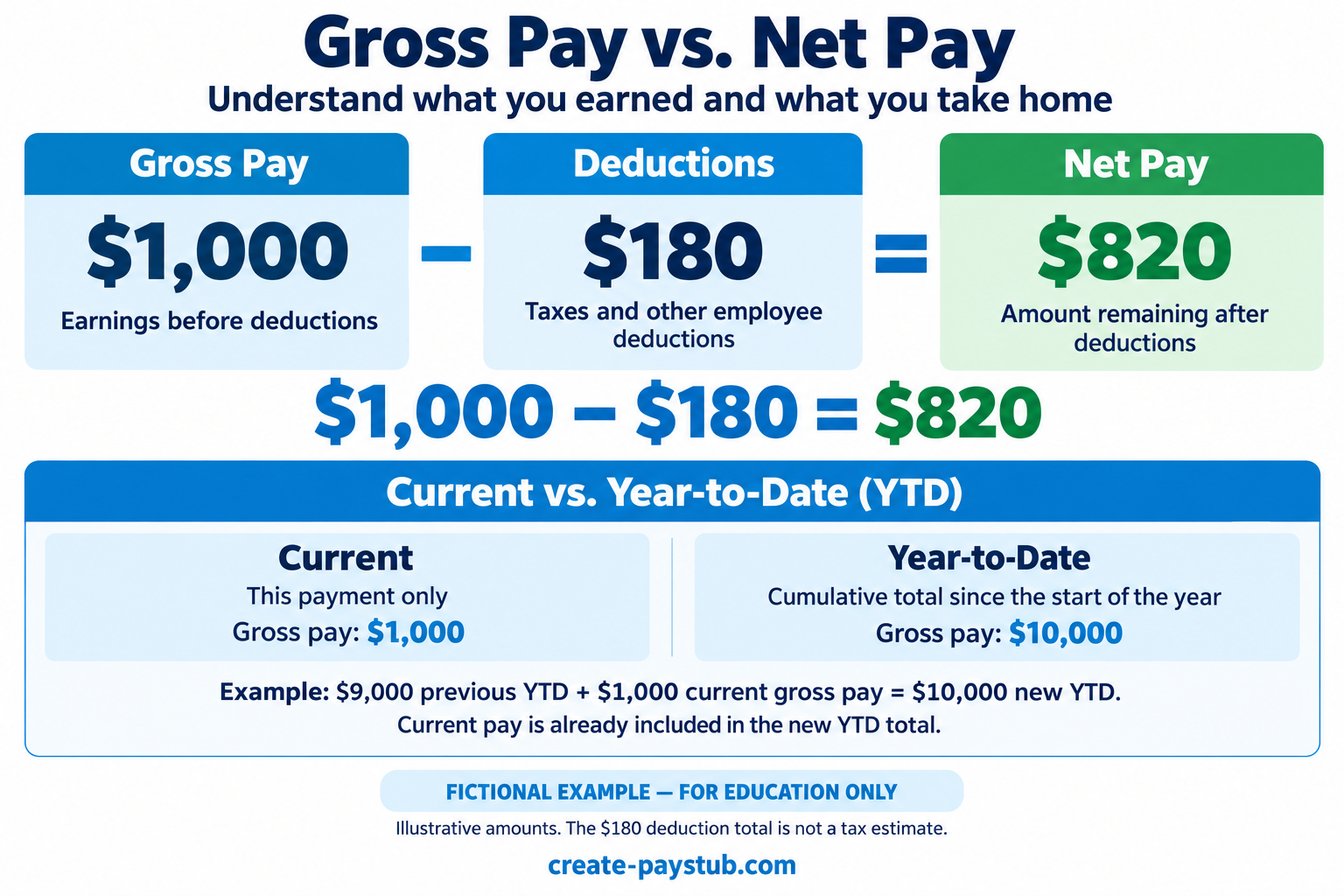
Gross pay: $1,000
Total employee deductions: $180
Net pay: $820
The check is $1,000 − $180 = $820. These are illustrative amounts; the $180 does not represent a recommended tax rate or a tax calculation.
Compare the net pay with the payment details. If you split direct deposit between accounts, compare the combined deposits rather than expecting one deposit to equal the full net amount. Ask payroll about reimbursements, adjustments, or other separate amounts if the payment still does not reconcile.
5. Separate current and YTD totals
Current usually refers to the payment covered by this stub. YTD, or year-to-date, is cumulative information from the beginning of the year. Do not add the YTD amount to the current amount to calculate this payment.
Suppose the previous stub showed $9,000 in YTD gross pay and the new payment adds $1,000 in gross pay. With no corrections or other intervening payments, the new YTD gross total would be $10,000.
Compare like-for-like columns: gross with gross, each deduction with its matching deduction, and net with net. If you changed employers, do not assume one employer’s YTD figures include wages paid by the other.
Questions and discrepancies
Why is my take-home pay different this time?
Compare the two stubs line by line. Start with hours and earnings, then look for changed deductions or adjustments. Identify the specific line that changed before asking payroll for an explanation.
Why does the same deduction label have two amounts?
Check the column headings. One may show the current payment and the other the cumulative YTD amount. Those figures describe different time spans.
What should I do if something looks wrong?
Save the stub and gather the relevant timesheet, pay agreement, or earlier statement. Contact payroll with the payment date, the field in question, and the difference you found. Request an explanation or a corrected record instead of changing the employer-issued document yourself.
What if I need to prepare a check stub?
Reading a stub and preparing one are different tasks. Our guide to making a check stub step by step explains which records to gather and what to review before completing a document.
This article explains common fields. Your payroll provider can clarify the labels and calculations used on your particular statement.