
A payroll register is a report that brings together employee pay calculations for a payroll run or selected reporting period. It typically lists earnings, employee tax withholding, other deductions, and net pay by employee, with totals for the group. Payroll staff use it to review a run, reconcile payments, and support accounting and tax reporting.
A register is different from a pay stub. The register gives an authorized reviewer a view across employees; a pay stub explains an individual employee’s payment. Neither a balanced spreadsheet nor a newly created document proves that the underlying wages were earned or paid. The figures must come from actual payroll records.
This U.S. guide explains how to read a register, compare it with individual statements, and catch a common funding mistake: treating total net pay as the entire payroll cost.
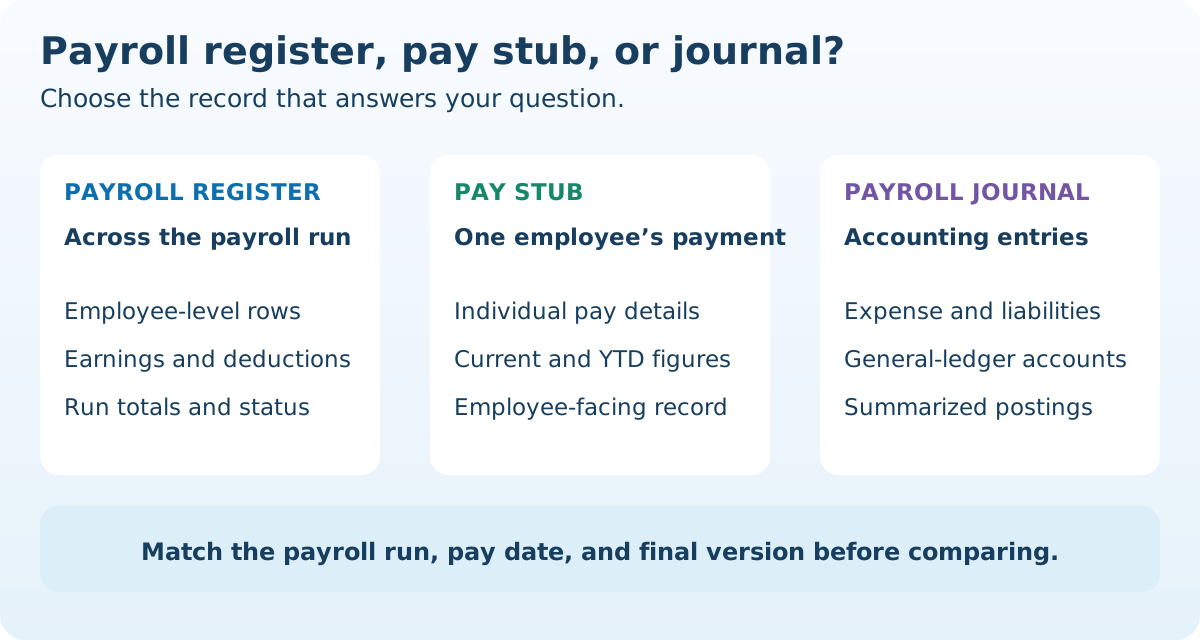
Payroll register, pay stub, and payroll journal: what is the difference?
These documents look at the same payroll from different directions. Report names vary by provider, so check what a report includes rather than relying on its label alone.
- Payroll register: Employee-level calculations and run totals. It may cover the whole run or a filtered department, location, or employee group.
- Pay stub or earnings statement: An individual employee’s earnings and deductions for a payment, often alongside year-to-date figures. See our guide to reading a check stub.
- Payroll journal: The accounting entries used to record payroll expense, cash, and liabilities in the general ledger. Depending on the system, these entries may be summarized or detailed.
- Payment or funding report: A report showing the payments or amounts to be debited for a run. Its scope may include fees or remittances that a wage register does not show.
Use a register to investigate which employee or deduction explains a total. Use the journal to check where that total was posted in the accounts. Use payment records to confirm what actually went out. An approved register is not, by itself, confirmation that a bank transfer settled.
What information should a payroll register include?
A useful review report needs enough detail to trace a number back to its source. Common fields include:
- Run identity: Employer or entity, run identifier, pay period, pay date, reporting filters, and draft or final status.
- Employee reference: A name or internal identifier that connects the row to the authorized employee record.
- Earnings detail: Hours, applicable rates, regular earnings, overtime earnings, bonuses, adjustments, and total gross wages.
- Taxable wage bases and employee withholding: Separate federal, Social Security, Medicare, and applicable state or local categories. Gross wages and every taxable wage base need not be identical.
- Other employee deductions: Benefit deductions, retirement contributions, and other applicable entries, identified by code and amount.
- Net pay and payment reference: The amount payable and, where available, the payment method or reference needed for reconciliation.
- Employer costs: Employer taxes and contributions in clearly separate columns or reports.
The Department of Labor’s recordkeeping guidance explains that covered employers need accurate records for covered nonexempt employees, including work hours, earnings, additions and deductions, payment dates, and the periods covered. It does not prescribe one particular report format. A register can organize part of that information, but a summary report may not contain every required underlying record.
Keep the code legend available. “Other” is difficult to review when it combines unrelated entries, and an employer contribution should not be mixed with employee deductions. Our pay-stub deduction-code guide explains how to ask for a precise code description.
A simplified payroll register example that balances
The following fictional cash-wage example contains two anonymous employees in one payroll run. It is a reconciliation exercise, not a complete payroll template. The tax and benefit amounts are assumed totals, not calculated tax rates or estimates. There are no reimbursements, noncash benefits, or other adjustments in this example.
Scroll horizontally on small screens to see every column.
| Employee | Gross wages | Employee taxes withheld | Benefit deductions | Net pay |
|---|---|---|---|---|
| Employee A | $1,000 | $170 | $30 | $800 |
| Employee B | $800 | $130 | $30 | $640 |
| Run total | $1,800 | $300 | $60 | $1,440 |
Check each row first: Employee A’s $1,000 − $170 − $30 = $800; Employee B’s $800 − $130 − $30 = $640. Then check each column and the combined result:
$1,800 gross wages − $300 employee taxes − $60 benefit deductions = $1,440 net pay.
The $1,440 should reconcile to the employee payments for this run. The $300 and $60 are amounts withheld from wages that must be handled through the applicable remittance processes; they do not disappear because the employees received less cash.
A balanced total does not establish that the hours, pay rates, tax settings, or deductions were correct. Two opposite errors can cancel in the totals. Review the underlying inputs as well as the arithmetic.
Why total net pay is not the full payroll funding amount
In the example, the employer pays $1,440 to employees and has $360 withheld from their wages for taxes and benefits. Together, these account for the $1,800 cash wages. The employer can also owe its own taxes and benefit contributions beyond those wages.
The IRS explains the distinction between employee and employer employment taxes: employers generally withhold the employee Social Security and Medicare amounts and pay the employer share. Federal unemployment tax, or FUTA, is paid from employer funds and is not withheld from employee pay.
Suppose the same fictional run has $150 of separate employer taxes. The limited example then accounts for $1,800 + $150 = $1,950 before employer benefit costs, service fees, or other expenses. The $150 is an assumed amount, not a tax calculation.
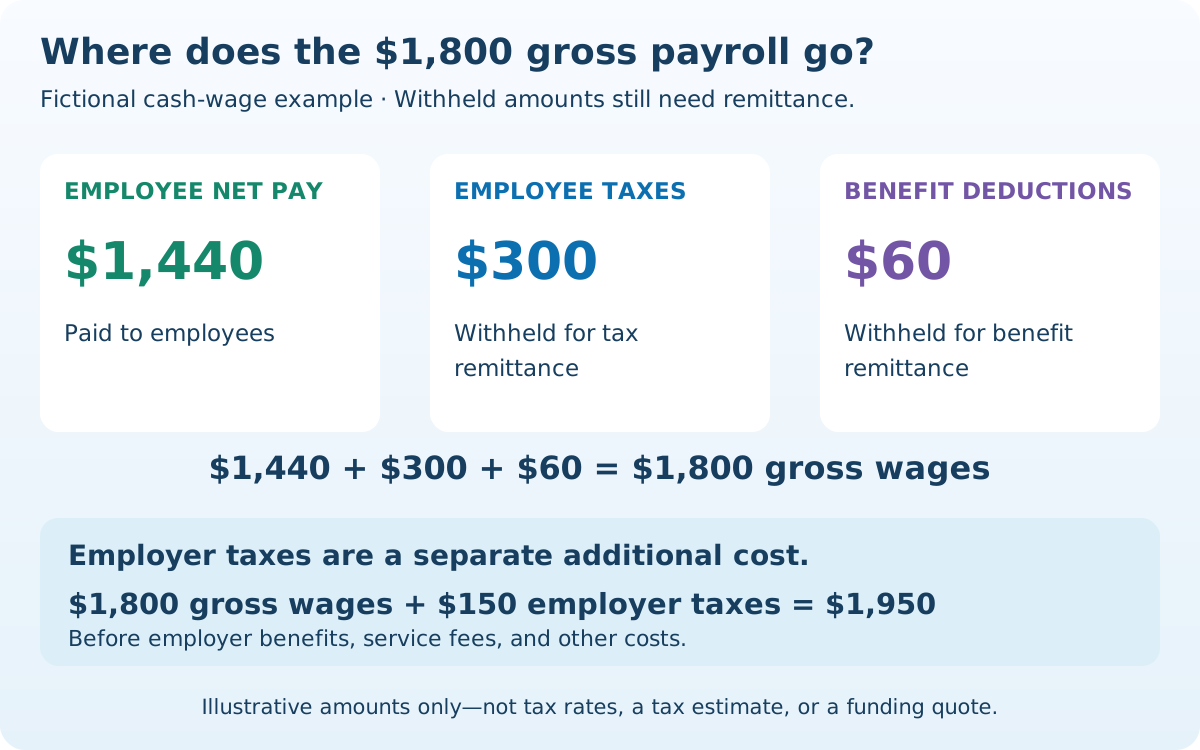
Do not add gross wages and net pay together: net pay is already part of the gross-wage reconciliation. Likewise, do not subtract employer taxes from employee net pay merely because both appear on one report.
The provider’s actual funding debit depends on which payments and remittances it handles, their timing, and any fees or adjustments. A liability total is not automatically the amount due on one date. Reconcile the funding report and service arrangements before approving a debit.
How to review and reconcile a payroll register
- Confirm the report’s scope. Match the entity, pay date, period, run ID, employee filters, and final status. Identify regular and off-cycle runs separately.
- Check the earnings inputs. Compare approved time records, pay rates, salary amounts, and authorized adjustments. For overtime, preserve the workweek detail; a pay-period total alone may hide the calculation. Our biweekly overtime review guide shows why this matters.
- Review taxable wages and deductions. Investigate unexpected codes, negative values, large changes, missing elections, or deductions taken twice. Compare the correct tax base rather than applying a percentage to every gross-pay figure.
- Compare individual statements. For a matching final run, check each employee’s current earnings, deductions, and net pay against the corresponding pay stub. Do not compare current register figures with year-to-date statement totals.
- Reconcile payments. Match the net-pay total to the relevant checks, deposits, and other employee payments. Account for split deposits, rejected transfers, voids, and reissues rather than silently treating an unpaid item as settled.
- Reconcile accounting and liabilities. Trace wage expense, withholding, benefit liabilities, employer costs, and cash to the journal and remittance records. A deduction recorded is not proof that it was remitted.
- Keep the review trail. Record who approved the run, what changed, and which version was finalized. Retain the original and corrected records so a later reviewer can explain the difference.
At quarter or year end, reconcile cumulative records to the relevant tax returns and employee forms using the appropriate wage categories. Gross wages need not equal every W-2 wage box; see why W-2 wages can differ from pay-stub gross pay. Include off-cycle runs and corrections in the reconciliation.
Is a payroll register required, and how long should it be kept?
Federal recordkeeping rules require applicable records, not a universal document named “payroll register.” A neatly formatted register does not replace missing time records, withholding certificates, payment evidence, or other supporting documents. State and local requirements can also affect the records and employee statements needed.
Keep these distinct federal rules in mind:
- FLSA payroll records: For records covered by the regulation, 29 CFR 516.5 specifies at least three years from the last entry. Different supporting records may have separate requirements.
- Employment tax records: The IRS record-retention guidance says at least four years after the tax becomes due or is paid, whichever is later. Some records and circumstances require longer retention.
The IRS employment-tax recordkeeping checklist includes wage-payment records, withholding certificates, deposit acknowledgments, filed returns, and benefit or reimbursement substantiation. A register alone is unlikely to cover that entire checklist.
Set a retention schedule that accounts for all applicable requirements and unresolved disputes or reviews. Do not delete a record simply because one minimum period has ended. Employee copies of pay stubs and an employer’s complete payroll file serve different purposes.
How to create and protect a useful payroll register
If your payroll system provides a register, start with its final-run report and confirm the fields and filters. If you use a spreadsheet, treat it as a controlled reporting record: define each column, identify the source of every input, protect formulas, and review totals before relying on them.
Keep calculated taxes tied to the actual payroll method and settings. Copying one employee’s withholding percentage to another is not a sound substitute for determining the applicable inputs. A register summarizes payroll; it does not itself authorize a deduction or determine legal worker classification.
Use internal employee identifiers in routine review exports where suitable, and keep the protected identity mapping and required personnel information available to authorized staff. Restrict access, use secure storage, keep backups, and preserve finalized versions. Sending an entire company register to answer one employee’s pay question can disclose other employees’ compensation unnecessarily.
For an employee query, provide the relevant individual statement or an appropriately limited explanation through the established channel. Our safe pay-stub sharing guide explains how to check the recipient and required fields. If a correction is needed, use the payroll correction process and document the effect on payments and reporting.
Common questions about payroll registers
Can a small business use a spreadsheet?
A spreadsheet can organize the report, but it must reflect accurate payroll calculations and supporting records. Protect formulas and access, keep a review trail, and check the applicable recordkeeping requirements. A spreadsheet format does not remove tax, payment, or reporting obligations.
Should a register include employer taxes?
They can appear in separate columns or a linked employer-cost report. Keep them distinct from employee withholding and identify whether the report covers wages, employee payments, liabilities, or total employer costs.
Can employees use a payroll register instead of a pay stub?
An individual statement is usually the more focused record for reviewing personal pay. A company register can contain other employees’ information and need not satisfy the applicable requirements for an employee wage statement. Request your own payroll records through the employer’s normal process.
Is a contractor payment log the same thing?
No. A log of contractor invoices or payments is a different record and does not establish employee status or W-2 wages. Keep the classification and reporting context clear; our independent-contractor documentation guide explains the distinction.
Does a register prove that a deposit was made?
No. It shows the payroll calculation and recorded status within its scope. Confirm actual payment using the corresponding payment and settlement records, especially after a rejection, void, or reissue.