
A pay stub explains a payment: who earned it, which dates it covers, how earnings were calculated, what was deducted, and what remained to be paid. Whether you are checking your first paycheck, requesting a missing statement, or preparing a record for your business, start with the underlying payroll information.
This U.S. beginner's guide brings those tasks together. Use it as a starting point, then follow the detailed guides linked throughout for overtime, taxes, benefits, corrections, and recordkeeping. A neatly formatted statement is useful only when its details accurately reflect the payment.
1. Choose the right starting point
The Consumer Financial Protection Bureau describes a pay stub as the record of earnings and deductions accompanying a paycheck. It is different from the payment itself: a deposit shows money arriving, while the statement explains the payroll amounts behind it.
- You need an employer-issued copy: check the payroll portal or contact payroll. If you have left the job, use our former-employer request guide.
- You want to understand a payment: start with its dates and earnings, then deductions and net pay.
- You prepare payroll records: gather verified inputs and applicable requirements before entering them into a template or tool.
- You need income documentation: ask the recipient which records, dates, and formats it accepts. A generated statement does not guarantee acceptance.
A pay stub is not a substitute for a W-2, W-4, or bank statement. Each document answers a different question. Keep those records together when reconciling a payment, but do not copy a number from one into another without checking what it represents.
2. Understand the main pay-stub fields
- Employee and employer details
- Identify whose earnings the statement describes and which employer issued it. Check spelling and any employee identifier before reviewing the amounts.
- Pay period
- The start and end dates covered by the earnings record. Compare these dates with time records.
- Pay date
- The date assigned to the payment. It can differ from the last day of the pay period. Read our pay period versus pay date guide for examples.
- Hours, rates, and earnings
- The inputs and amounts for regular work, overtime, and other earnings. Different rows may use different rates or repeat hours to calculate an extra premium.
- Gross pay
- Earnings before employee taxes and other deductions.
- Employee deductions
- Amounts withheld from the employee's pay. Separate these from employer-paid contributions displayed for information.
- Net pay
- The remaining pay after employee deductions. Reimbursements or other adjustments may need separate reconciliation.
- Current and YTD
- Current figures concern this payment; year-to-date figures accumulate the relevant category during the year. Do not add the two columns together.
Common labels include FIT or FITW for federal income tax withholding, SS or OASDI for Social Security, MED for Medicare, and PTO for paid time off. Labels are not standardized across every payroll provider. Ask payroll about an unfamiliar code rather than assuming its meaning.
3. Gather the information before preparing a pay stub
Use a source record for each field. This simple preparation checklist makes later review easier:
- Identity: verified employer and employee details, with the identifiers required for the statement.
- Dates: the actual pay period and payment date.
- Earnings: approved time records, agreed pay rates, salary allocation, and records supporting additional earnings.
- Deductions: payroll tax calculations, applicable elections or orders, and the deductions actually processed.
- Cumulative amounts: the previous payroll totals and any intervening adjustments.
- Payment: the payroll payment record, including separate or split payments where relevant.
A bank deposit alone is not enough to reconstruct gross pay and every deduction. If a required fact is missing, get the supporting record rather than filling the gap with an estimate. For multiple statements, build a separate row of verified inputs for each payment; do not duplicate the latest figures across earlier periods.
4. Follow a complete fictional arithmetic example
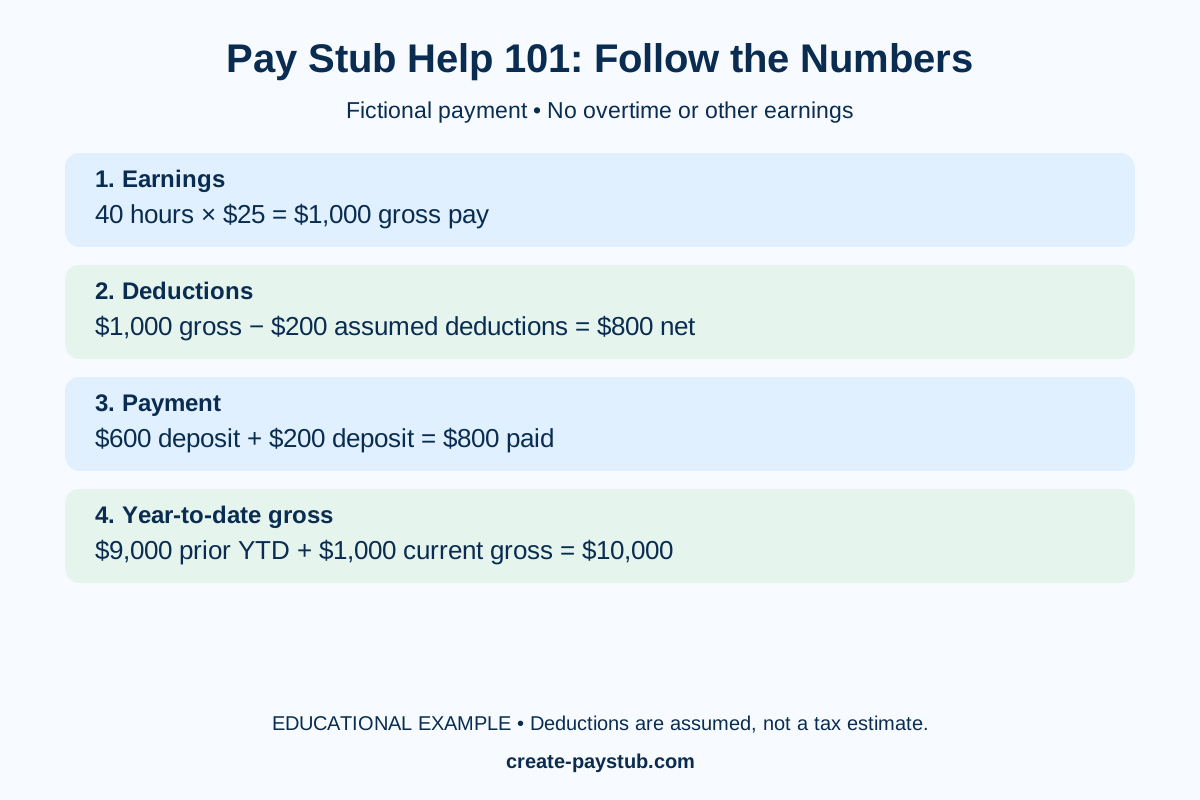
Assume a fictional hourly employee has 40 hours at $25, no overtime or extra earnings, and $200 in total employee deductions. The deduction amount is assumed solely to demonstrate subtraction; it is not a tax calculation or suggested withholding percentage.
- Gross earnings: 40 × $25 = $1,000.
- Net pay: $1,000 − $200 = $800.
- Payment check: if deposits are split into $600 and $200, their combined $800 matches net pay.
- YTD check: if previous YTD gross was $9,000, new YTD gross is $10,000, assuming no corrections or other payments.
This example has no reimbursements, noncash benefits, or payroll corrections. Do not force a more complicated statement into this simplified layout. Our deposit reconciliation guide covers mismatches, and our YTD guide explains how to compare cumulative totals.
5. Review taxes, benefits, and overtime separately
Federal income tax is not one universal percentage
Use the employee's applicable W-4 information and the appropriate payroll method. The IRS federal withholding instructions explain the calculations and distinguish 2020-or-later W-4 forms from older forms. Current forms do not use withholding allowances; asking every employee for an allowance count is not a reliable current-form workflow.
A withholding amount is not a final annual tax bill. To understand a tax line, start with our FIT versus FICA guide. If federal withholding is zero, use the zero-withholding checklist before assuming a mistake.
Benefit lines may use different tax treatment
Do not assume every deduction reduces every taxable-wage figure. Match the benefit label with payroll's explanation, and distinguish employee money from employer funding. Our guides to 401(k) deductions and HSA contributions explain common comparisons.
Overtime needs the correct workweek and regular rate
Under the standard federal rule for covered, nonexempt employees, overtime is due after 40 worked hours in a workweek at least at one-and-a-half times the regular rate. The Department of Labor's Fact Sheet 23 explains that hours cannot be averaged across multiple weeks. Other rules and exceptions can apply.
A two-week total of 80 hours does not rule out overtime in one of those weeks. Bonuses or multiple rates can also affect the calculation. Use the biweekly overtime guide or the two-rate example when the basic hours-times-rate check is insufficient.
6. Prepare an accurate statement step by step
- Select the payment. Establish the correct person, pay period, pay date, and payroll record.
- Enter identity details. Include applicable required information while protecting sensitive identifiers.
- Enter each earnings category. Keep regular pay, overtime, and additional earnings distinguishable; do not count overlapping amounts twice.
- Enter verified deductions. Use the actual payroll calculation and applicable basis for each amount.
- Reconcile net pay and YTD. Compare the resulting amounts with payment records and previous totals.
- Preview the document. Check labels, dates, decimals, omitted fields, and cut-off text as well as the arithmetic.
- Save and deliver securely. Retain the statement with its source records and use an appropriate delivery method.
For a focused preparation checklist, see how to make a check stub. Once the payroll facts are established, you can use Create Pay Stub to prepare the document. Review the current tool options and completed statement; creating a document does not itself establish correct payroll treatment.
7. Resolve common problems in a consistent order
Check the first point of disagreement rather than changing the final number until it looks right. A wrong pay period can make correct hours appear missing; a repeated differential-hours row can make total hours look too high.
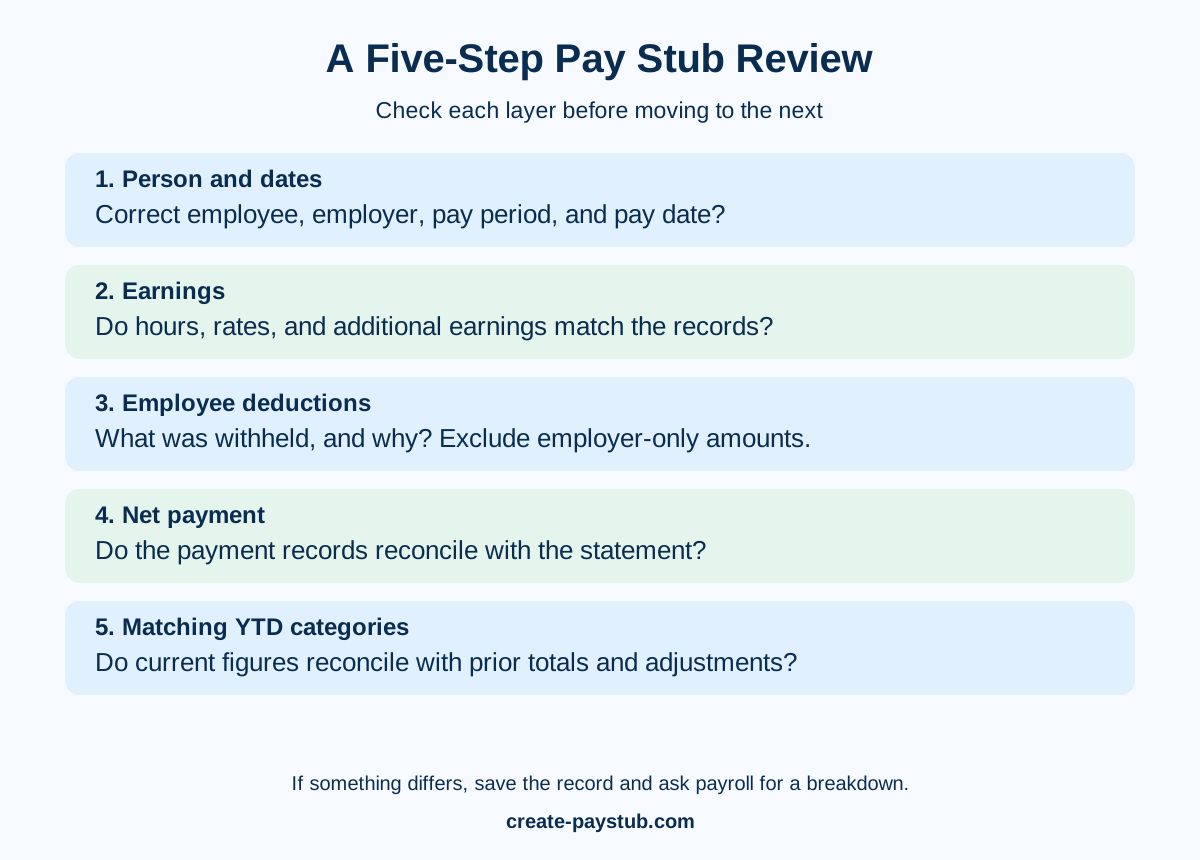
- Hours look wrong: compare the timecard and workweek boundaries. Remember that 7 hours 30 minutes equals 7.50 hours, not 7.30; see decimal hours explained.
- A bonus looks smaller: separate the gross award from deductions using our bonus-payment guide.
- An unfamiliar deduction appears: request the full description, amount, and basis for taking it.
- An earlier payment changes: ask which dates and amounts the adjustment concerns; see retroactive pay.
- Net pay matches but one deposit does not: check other destination accounts and separate payments before reporting missing money.
A useful message is: “On my statement dated [date], the [field] shows [amount]. My [timecard, agreement, or earlier statement] shows [different amount]. Please explain the difference and confirm whether a correction or additional payment is needed.” Keep the original and the response. Follow our correction checklist instead of editing an employer-issued statement yourself.
8. Check the requirements that apply to your location
The DOL's pay-stub FAQ states that the FLSA requires certain employer records but does not itself require employers to provide pay stubs. State requirements can still apply. A template field marked optional does not decide whether you may legally omit it.
For example, California's official wage-statement guidance describes required information and limits displayed Social Security information to the last four digits or an alternative employee identifier. This is a California example, not a nationwide field checklist. Distinguish information needed privately for payroll administration from information displayed on the statement.
Check the relevant state labor agency and your payroll obligations before deciding on required fields, electronic delivery, or retention. Avoid universal claims that an address or employer detail is always optional, or that every statement needs a full SSN printed on it.
9. Keep contractor records distinct from employee payroll
Choosing a “contractor” label does not determine worker status. For federal employment-tax purposes, the IRS common-law guidance considers behavioral control, financial control, and the relationship between the parties. A single question about who chooses the schedule is not a complete classification test.
If you are self-employed or documenting contractor payments, organize the actual invoices, payment records, and applicable tax documents. Ask the recipient which evidence it needs. Do not present a self-prepared income summary as an employer-issued wage statement, or invent employee withholding to make the document resemble one.
10. Save, deliver, and share pay records safely
Use a consistent file name containing the payment date and a suitable identifier, with access limited to the people who need the record. Keep a separate original when a correction is issued, and label the corrected copy clearly. Secure backups are useful; an unprotected shared folder can expose every statement at once.
Before sharing, verify the recipient and requested period. Use the recipient's secure upload method when available, and confirm whether redacted copies are acceptable before removing information. Never change earnings or employer details to satisfy a requested amount. Our safe-sharing guide and recordkeeping guide cover these decisions in more detail.
Frequently asked questions
Is a check stub the same as a pay stub?
The terms commonly refer to the earnings-and-deductions statement for a payment. Check the fields and issuing source rather than relying only on the title.
Can I get a pay stub if I use direct deposit?
Start with your employer's payroll portal or payroll team. Direct deposit and access to a wage statement are separate matters; the bank transaction does not contain every payroll detail.
Can I prepare several older statements together?
Yes, the records can be organized together, but verify each period separately. Earlier hours, deductions, and YTD totals should come from the corresponding payroll records, not from copying today's statement backward.
Will a generated pay stub be accepted for a rental or loan?
The recipient determines its documentation requirements and verification process. Ask first. A generated document neither guarantees acceptance nor independently verifies employment or income.
Why are W-2 wages different from my final gross-pay total?
The amounts may represent different wage categories or tax treatment. Compare the relevant boxes and payroll categories using our W-2 reconciliation guide, rather than assuming every annual total must match.
What should I do first if I still cannot reconcile my pay?
Save the statement, identify one specific discrepancy, and request a written payroll breakdown. If the issue concerns unpaid wages or unresolved legal requirements, contact the appropriate labor agency or qualified adviser with those records.